- <video width="320" height="240" controls="controls"> <source src="movie.mp4" type="video/mp4" />
- <source src="movie.ogg" type="video/ogg" />
- Your browser does not support the <video> element.
- </video>
- The controls attribute indicates that a control panel with play/stop/volume/progress widgets should be displayed;
- Usually the browser will use the first format it recognizes, (in this case, the browser checks whether mp4is supported, and if not, it will check for the ogg format, and so on)
- You cannot embed a Youtube video using <video> element. Instead, you often need to embed an <iframe> that will render the HTML5 videos in your Web site, and of course, the advertising that come along with them.
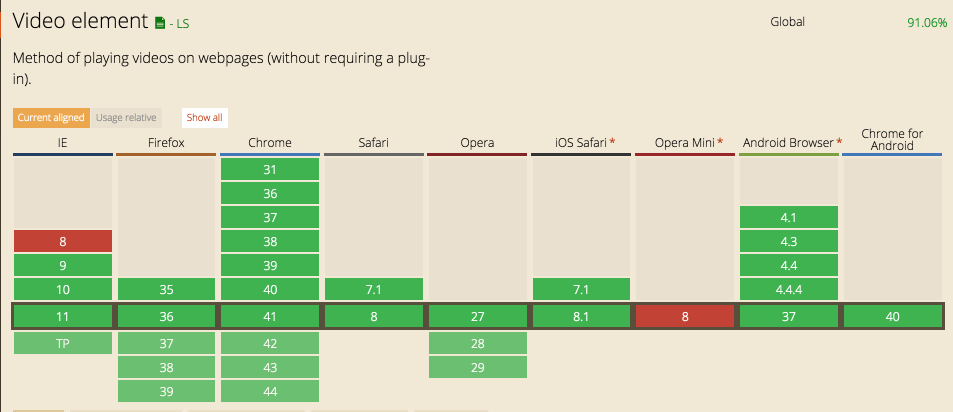
- The recommended codec that works on most browsers, as of 2015:
H264/mp4 - If the poster attribute is missing, usually the first non-blank frame of the video will be used as the image that is shown when the video is not playing. While this is the expected behaviour, Internet Explorer doesn’t actually do this, it displays the first frame of the video as soon as it can regardless of the poster value
- Once created or selected using the standard DOM API, can audio and video elements be manipulated as JavaScript objects
- accessible media player resources and demos
- Comparison matrix of most of the existing video players
- 10 recent players compared
- Unfortunately, the standard control bar cannot be accessed using CSS or the DOM API. Instead, hide the standard controls (ommit the controls attribute) and use your own HTML buttons, sliders, etc. to control the audio or video element using their JavaScript API.
| Name | Description |
|---|---|
| src |
Source of the video.
|
| width and height |
Size of the video.
If unspecified, the default width and height of the video will be used. If you specify one dimension but not the other, the browser will adjust the size of the unspecified dimension to preserve the aspect ratio of the video.
|
| controls |
If this boolean attribute is present, the browser displays its own controls for video playback and volume.
|
| poster |
This attribute allows you to specify an image that the browser will use while video is being downloaded, or until the user starts playing the video.
If this attribute is not specified, the first frame of the video will be used instead.
|
| autoplay | This attribute asks the browser to start playing the video automatically as soon as the page is ready. |
| preload |
The preload attribute is used when autoplay is not used. It tells the browser what to do before a user plays a video. This attribute is a hint, the browser may ignore it. While autoplay and preload are mutually exclusive, if both are present, then preload is ignored.
Possible values:
|
| loop | Another boolean attribute that indicates to play the video in loop mode (and it starts again when finished). |
http://www.jwplayer.com/html5/

No comments:
Post a Comment